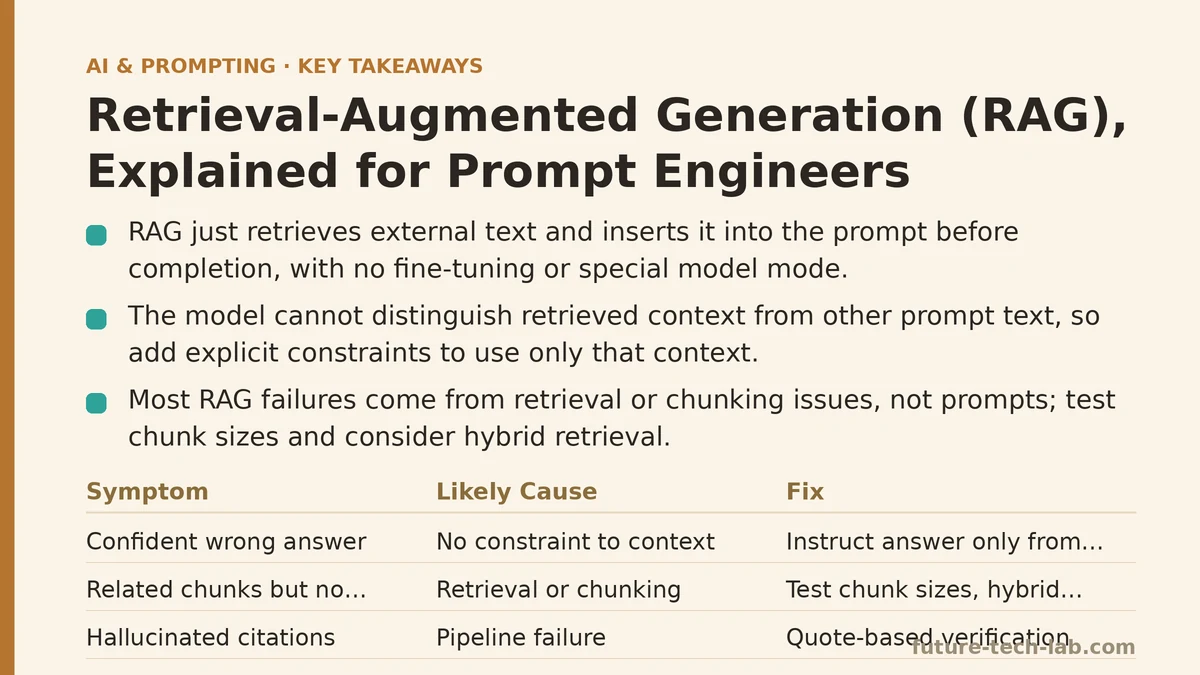
Retrieval-Augmented Generation is a pattern where a system fetches relevant text from an external source and inserts it into the prompt before the model generates a response. That’s the entire mechanism. There’s no special model mode, no fine-tuning step required, no magic flag you pass to the API. It’s a retrieval step followed by a normal completion call, and the model has no way of distinguishing retrieved context from anything else you typed into the prompt.
This matters for how you think about it as a prompt engineer. RAG doesn’t make the model smarter, and it doesn’t give the model access to a live database in any real sense. It gives the model more relevant tokens to condition on at inference time. Everything that goes wrong with RAG systems — hallucinated citations, irrelevant answers, contradictory outputs — traces back to a failure somewhere in that pipeline: bad retrieval, bad chunking, or a prompt that doesn’t tell the model how to use what it was handed.
The rest of this post treats RAG the way you’d treat a production system you’re debugging: symptom, root cause, fix. If you’ve already seen one of these failure patterns, skip to the matching section.
Symptom: The model answers confidently using information that isn’t in your documents
You ask a question, the retrieved chunks don’t actually contain the answer, and the model produces a fluent, plausible response anyway — sourced from its training data instead of your corpus.
Cause: No instruction telling the model to constrain itself to the retrieved context. Without an explicit boundary, the model treats retrieved passages as helpful context, not as the sole permitted source of truth. It falls back on its parametric knowledge because nothing in the prompt forbids that.
Fix: State the constraint directly in the system or instruction prompt: “Answer only using the information in the provided context. If the answer isn’t present, say you don’t have enough information.” This single line changes the model’s behavior more than almost any other prompt adjustment in a RAG pipeline. Pair it with a low-effort verification step — asking the model to quote the specific sentence it based its answer on — and you get a cheap, built-in check against fabrication.
Symptom: The retrieved chunks are topically related but don’t answer the question
The system pulls back paragraphs that mention the right keywords, but none of them contain the specific fact the user asked for. The model then either hedges or, worse, stitches together an answer from adjacent but wrong information.
Cause: This is almost never a prompt problem — it’s a retrieval and chunking problem. If your chunk size is too large, the relevant sentence gets diluted by surrounding text and the embedding for that chunk doesn’t score well against the query. If it’s too small, you lose the surrounding context that would have made the chunk relevant in the first place. Either way, the embedding similarity between the query and the correct chunk is weaker than it should be.
Fix: This is one case where no prompt rewrite saves you. Test chunk sizes empirically — 200 to 500 tokens is a reasonable starting range, with overlap between chunks so a fact near a boundary doesn’t get orphaned. Consider hybrid retrieval: combine dense vector search with a keyword-based method like BM25, since embeddings can miss exact-match terms like product codes or proper nouns that a keyword search would catch immediately. If you’re still missing obvious answers after tuning chunking, log the actual retrieved chunks for a sample of failing queries before touching the prompt at all — you need to know whether the model or the retriever is at fault.
Symptom: The model ignores retrieved context and answers from general knowledge instead
The relevant passage is sitting right there in the prompt, but the model gives a generic answer that could have come from anywhere.
Cause: Position and framing both matter here. Models tend to weight information at the beginning and end of a long context window more heavily than information buried in the middle — a well-documented effect sometimes called “lost in the middle.” If your retrieved chunks are dumped in the center of a long prompt, surrounded by system instructions before and a user question after, the model’s attention on that content is weaker than you’d assume just because it’s technically present in the context window.
Fix: Put the retrieved context close to the question, not far from it, and label it explicitly with a delimiter — something like a ### Context heading followed by the chunks, immediately preceding ### Question. Explicit structure does real work here: it’s not just readability for humans, it changes how strongly the model associates that block of text with the instruction to use it. If you’re working with a long context window and multiple retrieved chunks, order them by relevance score, most relevant last, right before the question — recency within the window is a cheap way to counteract the middle-of-context attention drop.
Symptom: Latency is too high for a chat-like interface
Users expect a response in a second or two. Instead there’s a multi-second pause before anything streams back, and it gets worse under concurrent load.
Cause: RAG adds sequential steps in front of the actual generation call: embed the query, search the vector store, possibly rerank the results, then assemble the final prompt. Each step adds latency, and unlike the generation step itself, none of it is hidden from the user by token streaming — the user is staring at a blank state until retrieval finishes.
Fix: Profile each stage separately before optimizing blindly. Query embedding is usually cheap; vector search latency depends heavily on index size and type (an HNSW index scales better than brute-force nearest neighbor once you’re past a few hundred thousand vectors); reranking with a cross-encoder is often the most expensive step per query if you’re running one. If reranking is the bottleneck, consider reserving it for cases where initial retrieval scores are ambiguous, rather than running it on every query. Caching embeddings for frequently repeated queries and precomputing document embeddings offline — rather than at query time — removes work from the hot path entirely.
Symptom: The system worked in testing but degrades as the document set grows
Everything checked out on a hundred test documents. At ten thousand documents, answer quality drops and irrelevant chunks start showing up more often.
Cause: Retrieval quality doesn’t degrade gracefully by default — as the corpus grows, the odds increase that some unrelated document contains text that’s superficially similar to the query in embedding space. Your top-k retrieval starts returning near-miss chunks that scored well numerically but aren’t the right answer, and the model has no way to know the difference once they’re in the prompt.
Fix: Reevaluate your retrieval pipeline at scale, not just at prototype size. Increase k modestly and add a reranking step to filter the initial candidate set down to the ones that are actually relevant, rather than relying on raw vector similarity alone. Add metadata filters — document date, source, category — so retrieval can narrow the search space before similarity scoring even runs, rather than searching the entire corpus for every query. And revisit your chunking strategy periodically; a scheme that worked at a hundred documents may need adjustment at ten thousand, because the density of near-duplicate or superficially similar content changes the shape of the problem.
Symptom: You can’t tell whether a bad answer is a prompt problem or a retrieval problem
An answer comes back wrong, and it’s not obvious whether the fix is a prompt tweak, a retrieval tweak, or both.
Cause: Most RAG debugging fails here because the two layers get treated as one system instead of two independently testable ones. A prompt change can’t fix a retrieval failure, and a retrieval fix won’t matter if the prompt doesn’t instruct the model to use what it retrieved.
Fix: Isolate the layers explicitly. Log the raw retrieved chunks for every query during development, before they’re inserted into the prompt. If the correct information isn’t in the retrieved set, that’s a retrieval problem — go back to chunking, embedding choice, or hybrid search. If the correct information is present in the retrieved chunks but the final answer still misses it, that’s a prompt problem — check instruction placement, explicit constraints, and context position. Never diagnose these two failure modes at the same time; fix one and rerun before touching the other.
Quick Reference
| Symptom | Layer at Fault | First Thing to Check |
|---|---|---|
| Confident answers not grounded in context | Prompt | Missing “answer only from context” instruction |
| Retrieved chunks are irrelevant | Retrieval | Chunk size, embedding model, keyword vs. vector search |
| Context present but ignored | Prompt structure | Position of context relative to the question |
| Slow response times | Pipeline | Vector search latency, reranking cost, caching |
| Quality drops as corpus grows | Retrieval | Top-k, reranking, metadata filtering |
| Unclear where the failure is | Diagnostic process | Log retrieved chunks separately before blaming the prompt |
RAG is a pipeline, not a capability. Every failure mode above traces back to one of exactly two places — what got retrieved, or what the model was told to do with it — and conflating those two layers is the most common reason RAG debugging drags on longer than it should. Separate them first, and most of these symptoms turn out to have a fix that takes minutes, not a rebuild. Related guides: The React Prompting Framework: How Reasoning and Acting Work Together in LLMs, Prompt Engineering for AI Video Generation: A Sora, Runway, and Pika Guide, and AI Prompt Security Best Practices for Enterprise Teams.
🔗 Recommended Reading
- How to Build a Semantic Search Engine with Embeddings: A Beginner's Step-by-Step Tutorial
- Building Your First RAG Chatbot: A Step-by-Step Tutorial for Beginners
- Function Calling for Beginners: A Step-by-Step Tutorial to Connecting LLMs to External APIs
- Vector Databases Explained: A Beginner's Guide to Storing and Querying Embeddings
- How to Evaluate LLM Outputs: A Beginner's Step-by-Step Tutorial to Testing and Scoring AI Responses