After reading this post, you will be able to pick a vector database for a retrieval-augmented generation pipeline based on your actual constraints — deployment model, filtering needs, scale ceiling, and operational budget — instead of picking whichever one has the loudest marketing. You will also see runnable code for the same workload in all three, so the differences are concrete rather than abstract. The comparison below is structured as myth versus reality, because most public debate about these tools focuses on benchmarks that rarely match what a real RAG pipeline experiences in production.
Myth 1: “They’re basically the same product with different logos”
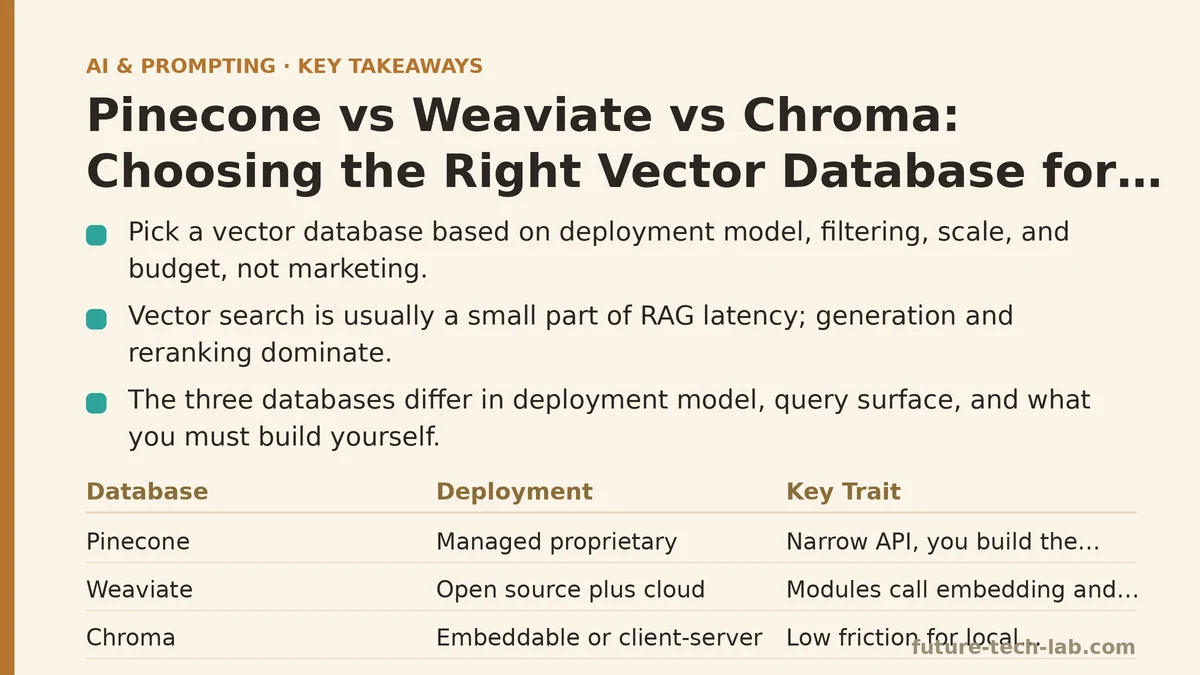
The reality is that Pinecone, Weaviate, and Chroma solve the same problem with three different philosophies about where the operational burden should live.
Pinecone is a managed, proprietary vector database. You do not run servers. You create an index via an API call, send vectors, and query them. The abstraction is deliberately narrow: it stores vectors and metadata, supports namespaces, and returns nearest neighbors. Everything else — embedding generation, chunking, reranking, LLM orchestration — is your responsibility. There is an open-source-adjacent local mode used mainly for testing, but the production shape is fully hosted.
Weaviate is an open-source vector database with a first-party managed cloud offering. It ships with a GraphQL API, a REST API, a client for most major languages, and — importantly — a module system that lets the database itself call embedding models, rerankers, and generative models during query time. You can run it yourself via Docker or Kubernetes, or you can pay Weaviate to run it for you.
Chroma is an open-source, embeddable vector store that began life as an in-process Python library and has grown into a client-server deployment as well. It is the lowest-friction option to get a RAG prototype running locally, and the friction stays low until you need distributed scaling or fine-grained access control.
The overlap is real — all three do approximate nearest neighbor search over embeddings. The divergence is in deployment model, query surface, and what problems the vendor expects you to bring in-house versus what they solve for you.
Myth 2: “Benchmark QPS numbers tell you which one is faster”
Public benchmark charts usually measure recall and queries-per-second on a fixed dataset with a fixed index configuration. Those numbers are real, but they rarely transfer to your pipeline, because the dominant cost in a RAG query is usually not the vector search.
Consider the actual shape of a RAG request:
- Embed the user’s query (one model call, tens to hundreds of milliseconds).
- Look up nearest neighbors in the vector store (single-digit to low-double-digit milliseconds for a well-sized index).
- Apply metadata filters, if any.
- Optionally rerank the top-K results with a cross-encoder (often the second-largest cost).
- Assemble a prompt and call the generation model (usually the largest cost by far).
If generation takes 1.5 seconds and vector search takes 8 milliseconds, an alternative database that searches in 4 milliseconds does not meaningfully improve user-perceived latency. What does move latency is filter performance under load, index rebuild behavior during incremental writes, and whether the query path makes extra network hops.
So the useful comparison question is not “which has the highest QPS on ann-benchmarks” but “which one keeps its tail latency predictable when I combine vector search with metadata filters and concurrent writes.”
Myth 3: “Chroma is only for toys, Pinecone is only for enterprises”
This is the myth that causes the most wasted engineering time, in both directions.
Chroma handles real workloads. A single-node Chroma deployment with a persistent local directory or a small server can serve thousands of documents and tens of thousands of chunks without trouble. Teams ship internal tools, small SaaS features, and documentation assistants on it routinely.
Pinecone handles small workloads equally well — the pricing model means a tiny index is cheap, and the operational simplicity is arguably more valuable at small scale than at large scale, because you have fewer engineers to spare.
The right split is not by size but by what kind of operational shape you want:
- If you want zero infrastructure and are willing to pay a per-usage premium: managed service.
- If you want self-hosted control and are willing to run containers: open-source server.
- If you want the store to live inside your application process with minimal setup: embedded library.
Weaviate sits in an interesting middle position — open-source core with a managed cloud that uses the same APIs, so you can prototype locally and promote to hosted without rewriting query code.
Myth 4: “Metadata filtering is an afterthought”
For RAG specifically, metadata filtering is often the difference between a useful retrieval and a useless one. Consider a multi-tenant SaaS where every document belongs to a customer. Without a reliable tenant filter, similarity search can return another customer’s content, which is both a correctness bug and a compliance incident.
All three databases support metadata filters, but the ergonomics and performance characteristics differ.
Pinecone applies filters as part of the query object, and supports $eq, $ne, $in, $nin, $gt, $gte, $lt, $lte, $and, $or. Selective filters can reduce the effective search space, and very selective filters on a large index can push latency up if the filter eliminates most candidates — the pre-filter behavior is worth understanding before you rely on it.
Weaviate exposes filters through its where clause in GraphQL or via the client’s Filter builder. It supports both pre-filtering and a hybrid search mode that combines BM25 keyword matching with vector similarity, which is often more robust for RAG than pure vector search on sparse or jargon-heavy corpora.
Chroma supports where filters with $eq, $ne, $in, $nin, $gt, $gte, $lt, $lte, and $and/$or. It also supports where_document for filtering on the text content itself. For small-to-medium collections, filtering performance is not usually a bottleneck.
The practical rule: if your RAG system needs a tenant or access-control filter on every query, benchmark that specific filter under realistic concurrency before committing to a database. Filtered vector search is a different workload than unfiltered search, and the two can rank differently across systems.
A concrete implementation path: the same workload in all three
The scenario: you have a support-docs knowledge base, chunked into pieces of roughly 500 tokens each. Each chunk has metadata: doc_id, section, last_updated, and tenant_id. Users query in natural language, and you want top-5 chunks filtered to their tenant.
The setup -> change -> verify loop is the same conceptually in each: create a collection, upsert vectors with metadata, run a filtered query, inspect the results.
Step 1: Embed the chunks
Whatever database you choose, embeddings are your input. This step is database-agnostic:
from openai import OpenAI

client = OpenAI()

def embed(texts: list[str]) -> list[list[float]]:
    response = client.embeddings.create(
        model="text-embedding-3-small",
        input=texts,
    )
    return [item.embedding for item in response.data]

chunks = [
    {"id": "doc1-chunk3", "text": "To rotate an API key, go to Settings > Security...",
     "doc_id": "doc1", "section": "Security", "tenant_id": "acme", "last_updated": "2026-05-01"},
    {"id": "doc2-chunk1", "text": "Billing cycles renew on the first of the month...",
     "doc_id": "doc2", "section": "Billing", "tenant_id": "acme", "last_updated": "2026-04-12"},
    {"id": "doc3-chunk7", "text": "Webhook retries use exponential backoff capped at 24 hours...",
     "doc_id": "doc3", "section": "API", "tenant_id": "globex", "last_updated": "2026-06-20"},
]

vectors = embed([c["text"] for c in chunks])
The text-embedding-3-small model returns 1536-dimensional vectors. Note this down, because the collection’s dimension parameter must match exactly — a mismatch is one of the most common setup errors across all three databases.
Step 2a: Pinecone — create, upsert, query
from pinecone import Pinecone, ServerlessSpec

pc = Pinecone(api_key="YOUR_API_KEY")

pc.create_index(
    name="support-docs",
    dimension=1536,
    metric="cosine",
    spec=ServerlessSpec(cloud="aws", region="us-east-1"),
)

index = pc.Index("support-docs")

index.upsert(vectors=[
    {
        "id": c["id"],
        "values": v,
        "metadata": {
            "text": c["text"],
            "doc_id": c["doc_id"],
            "section": c["section"],
            "tenant_id": c["tenant_id"],
            "last_updated": c["last_updated"],
        },
    }
    for c, v in zip(chunks, vectors)
])

query_vector = embed(["how do I rotate my API key"])[0]

results = index.query(
    vector=query_vector,
    top_k=5,
    include_metadata=True,
    filter={"tenant_id": {"$eq": "acme"}},
)

for match in results["matches"]:
    print(match["score"], match["metadata"]["section"], match["metadata"]["text"][:60])
Two details worth knowing. First, the filter is expressed as a dict with operator keys — this is Pinecone-specific syntax, not JSONPath. Second, the metadata payload has size limits, so storing the full chunk text in metadata is fine for short chunks but wasteful for long ones; storing a doc_id plus a byte offset and retrieving text from your own store is a common pattern.
Step 2b: Weaviate — create, upsert, query
import weaviate
import weaviate.classes.config as wvc
import weaviate.classes.query as wvq

client = weaviate.connect_to_local()

if client.collections.exists("SupportDoc"):
    client.collections.delete("SupportDoc")

collection = client.collections.create(
    name="SupportDoc",
    vectorizer_config=wvc.Configure.Vectorizer.none(),
    properties=[
        wvc.Property(name="text", data_type=wvc.DataType.TEXT),
        wvc.Property(name="doc_id", data_type=wvc.DataType.TEXT),
        wvc.Property(name="section", data_type=wvc.DataType.TEXT),
        wvc.Property(name="tenant_id", data_type=wvc.DataType.TEXT),
        wvc.Property(name="last_updated", data_type=wvc.DataType.DATE),
    ],
)

with collection.batch.dynamic() as batch:
    for c, v in zip(chunks, vectors):
        batch.add_object(
            properties={
                "text": c["text"],
                "doc_id": c["doc_id"],
                "section": c["section"],
                "tenant_id": c["tenant_id"],
                "last_updated": c["last_updated"],
            },
            vector=v,
        )

query_vector = embed(["how do I rotate my API key"])[0]

response = collection.query.near_vector(
    near_vector=query_vector,
    limit=5,
    filters=wvq.Filter.by_property("tenant_id").equal("acme"),
    return_metadata=wvq.MetadataQuery(distance=True),
)

for obj in response.objects:
    print(obj.metadata.distance, obj.properties["section"], obj.properties["text"][:60])

client.close()
Notice Vectorizer.none() — this tells Weaviate not to generate embeddings itself and to rely on the vectors you supply. If you want Weaviate to call an embedding model for you (via a module like text2vec-openai), you can configure a vectorizer instead, in which case you would send text and skip the vector= argument. That is a meaningful architectural difference: embeddings can be generated at write time by the database rather than by your application.
The batch import uses batch.dynamic(), which auto-throttles the number of in-flight objects based on server response times. For large imports this matters more than the raw client-side throughput.
Step 2c: Chroma — create, upsert, query
import chromadb

client = chromadb.PersistentClient(path="./chroma_data")

collection = client.get_or_create_collection(
    name="support_docs",
    metadata={"hnsw:space": "cosine"},
)

collection.upsert(
    ids=[c["id"] for c in chunks],
    embeddings=vectors,
    documents=[c["text"] for c in chunks],
    metadatas=[
        {
            "doc_id": c["doc_id"],
            "section": c["section"],
            "tenant_id": c["tenant_id"],
            "last_updated": c["last_updated"],
        }
        for c in chunks
    ],
)

query_vector = embed(["how do I rotate my API key"])[0]

results = collection.query(
    query_embeddings=[query_vector],
    n_results=5,
    where={"tenant_id": "acme"},
)

for doc_id, distance, text in zip(
    results["ids"][0], results["distances"][0], results["documents"][0]
):
    print(distance, doc_id, text[:60])
Chroma’s query returns parallel lists keyed by ids, distances, documents, and metadatas. Chunks that exceed the collection’s capacity simply do not appear — there is no separate “no results” flag beyond an empty list, so check len(results["ids"][0]) before assuming a match exists.
Step 3: Verify
Whichever path you took, verify three things before moving on:
- Count check. Run a count query and confirm it matches the number of chunks you upserted. If it is lower, some upserts failed — check your client logs for per-object errors.
- Filter check. Query with a filter for a tenant you know exists and one you know does not. The first should return results; the second should return an empty list. If the second returns results, your filter is not being applied.
- Relevance spot check. Run the same query with and without the filter, and eyeball the top results. If filtering dramatically changes the top score, your metric or your embedding model may be mismatched with the corpus.
That is the whole loop: embed once, upsert once, query with a filter, verify three invariants. From there, iteration is about chunking strategy and reranking, not about the database.
Myth 5: “You should pick based on features, not constraints”
Features are easy to compare on a table. Constraints are what determine whether the project ships.
The constraint that filters out the most options in practice is deployment model. If your organization cannot send document text or embeddings to a third-party API, then managed Pinecone is off the table regardless of how good its filtered search is, and managed Weaviate Cloud is equally off the table — you would run the open-source Weaviate yourself. If your organization has no infrastructure team and no appetite for operations, the reverse holds, and a self-hosted Weaviate cluster becomes a liability.
The second most common constraint is data residency. Self-hosted options let you place the store in a specific region or on-premises; managed options offer region selection within their supported footprint. If your compliance posture requires an audit of the physical location of the vector data, that narrows the field quickly.
The third is cost shape. Managed services typically price on stored vector count, dimensions, and query volume. Self-hosted pricing is a function of the compute and storage you provision, which is more predictable at steady state but requires capacity planning. For a small corpus with bursty traffic, managed is often cheaper. For a large, steady corpus, self-hosted often wins on unit economics.
Myth 6: “Migrating later is easy, so start anywhere”
Migration is possible but not free. The friction comes from three places:
Client API surface. Each database has its own query language. Pinecone uses a Python dict with $eq style operators. Weaviate uses a filter builder or GraphQL where clause with Equal/GreaterThan operators. Chroma uses a where dict with a slightly different operator set. Porting a nontrivial query layer is a rewrite of that layer, not a config change.
Metadata schema. All three store metadata as key-value pairs, but each constrains types differently. Weaviate requires you to declare properties and their types at collection creation time. Pinecone and Chroma accept metadata at upsert time with fewer upfront declarations, but schema drift then becomes your problem.
Semantics of filtering. The three systems do not implement filtered vector search identically. A filter that returns the expected top-K on one system can return a different result set on another if the index does pre-filtering versus post-filtering, or if the underlying ANN algorithm interacts differently with the filter. This is exactly the kind of thing that looks fine in development and misbehaves under load.
The practical implication: spike with any of them, but before you commit, port your real query set — including the filters you will use — and compare results. A half-day portability test at the start is cheaper than a multi-week migration later.
Decision rule
If you want zero infrastructure and are comfortable with a managed service and its pricing curve, Pinecone is the least friction. You trade control and some cost predictability for not having an on-call rotation around a stateful database.
If you need self-hosted or hybrid deployment with a first-party managed option using the same APIs, and you want query-time access to rerankers or embedding modules, Weaviate is the strongest fit. The cost is a larger surface area to learn — GraphQL, filter builders, and module configuration all take time.
If you are building a prototype, an internal tool, or a small product where the vector store can live inside or next to your application, Chroma is the fastest path from zero to a working RAG loop. The trade-off is that the operations story is thinner, so plan for what happens when your index outgrows a single node.
Whichever you choose, decide the answer to three questions before writing the first upsert: where does the data physically live, who operates the store, and what does a filtered query look like under realistic concurrency. Those three answers pick the database far more reliably than any feature matrix.
Related guides: Vector Databases Explained: A Beginner’s Guide to Storing and Querying Embeddings, Building Your First RAG Pipeline: A Beginner’s Step-by-Step Guide, and Troubleshooting RAG Pipelines: Common Retrieval Failures and How to Fix Them.
🔗 Recommended Reading
- How to Build a Semantic Search Engine with Embeddings: A Beginner's Step-by-Step Tutorial
- Building Your First RAG Chatbot: A Step-by-Step Tutorial for Beginners
- Function Calling for Beginners: A Step-by-Step Tutorial to Connecting LLMs to External APIs
- Vector Databases Explained: A Beginner's Guide to Storing and Querying Embeddings
- How to Evaluate LLM Outputs: A Beginner's Step-by-Step Tutorial to Testing and Scoring AI Responses