Most tutorials show you the happy path: send a prompt, get a response, display it. The reality of integrating an LLM API into a production system is closer to debugging a distributed system where one of the components is a black box that occasionally lies to you. The confusion between “your code is broken” and “the model output is unpredictable” is where most integration projects lose their momentum.
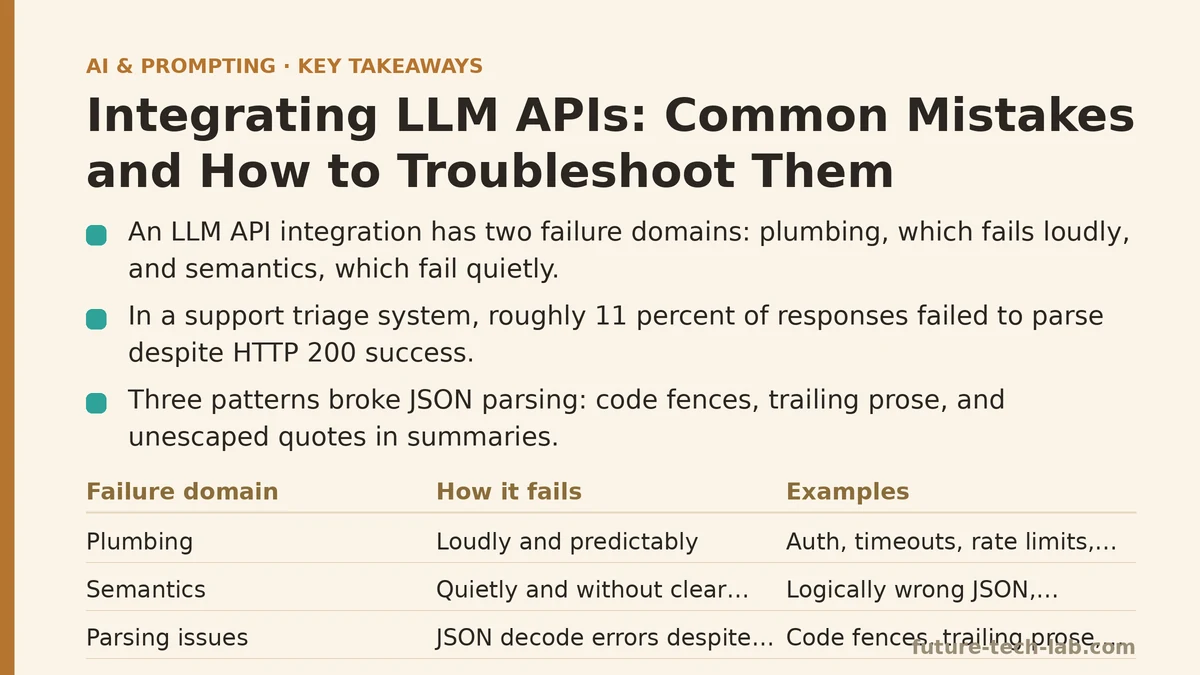
Here is the distinction worth making early: an API integration has two failure domains. The first is the plumbing — authentication, network timeouts, rate limits, malformed request schemas. These fail loudly and predictably. The second is the semantics — the model returns valid JSON that is structurally correct but logically wrong, or it returns text that refuses to be parsed reliably. These fail quietly and seem to follow no pattern. Most troubleshooting guides address one domain or the other. This post walks through both, using a single production integration as the case study, so you can see where the boundaries between the two sit.
The Case Study: A Support Ticket Triage System
The project was a support ticketing tool that needed to classify incoming tickets into categories (“billing”, “technical”, “account access”, “feature request”), assign a priority (low, medium, high, urgent), and extract a short summary for the dashboard. Roughly 2,000 tickets per day. The whole pipeline had to run server-side, batch-process new tickets every five minutes, and write results into an existing PostgreSQL database.
The stack was Python 3.11 on FastAPI, with the openai library pinned at version 1.30. The target model was gpt-4o-mini for cost reasons, with gpt-4o as a fallback for tickets the smaller model flagged as ambiguous.
The implementation looked straightforward. We sent each ticket’s text to the API with a system prompt describing the output format, received a JSON response, parsed it, and stored the fields. Within two days of running against live traffic, we had a spreadsheet of failure modes that fell into four distinct patterns. Each pattern required a different fix, and the first one can take days to isolate because it is tempting to assume the problem is in your own code.
Mistake 1: Treating the Output as Reliable JSON When the Model Decided Otherwise
The first failure surfaced as a stream of JSONDecodeError exceptions in the worker logs. About 11% of responses were failing to parse. The API call was succeeding — HTTP 200, no rate limit errors, no content filter flags — but the response.choices[0].message.content field contained text that was not pure JSON.
Here is what the json.loads() call was choking on:
{"ticket_id": "T-48291", "category": "billing", "priority": "high", "summary": "User was charged twice for the same invoice. They want a refund processed by Friday. Please see attached screenshot for the duplicate charge on March 3rd."}
That looks like valid JSON, and it is. The problem was the responses that were almost valid. In testing, we found three recurring patterns:
- Code fences. The model wrapped the JSON in markdown:
json .... We never asked for markdown in the prompt, but the model defaulted to it about 4% of the time because the training data associates JSON with code blocks. - Trailing prose. After the closing brace, the model added a sentence like “Let me know if you need any adjustments to this classification.” We explicitly requested “Respond only with a JSON object. No additional text.” A single instruction in a system prompt, buried under the rest of the context, did not hold reliably.
- Unescaped quotes. A ticket containing a quote like
He said "just refund me"would come back with those quotes unescaped inside the summary field, breaking the JSON grammar. The model was copying the user’s raw text verbatim instead of escaping inner quotes.
The Fix: Defense in Depth, Not a Better Prompt
The instinct is to rewrite the prompt with stronger language. Doing that can cut the failure rate substantially, often by a few percentage points. Then it plateaued. Prompt wording alone would not solve this because the model’s output distribution on any given request is sampled — you cannot guarantee a grammar with a prose instruction.
What worked was a three-layer sanitization pipeline:
import json
import re

def parse_model_json(raw_content: str) -> dict:
    """Attempt multiple recovery strategies before raising."""

    # Strategy 1: Try direct parse
    try:
        return json.loads(raw_content)
    except json.JSONDecodeError:
        pass

    # Strategy 2: Strip markdown code fences if present
    fence_pattern = r'```(?:json)?\s*(.*?)\s*```'
    fence_match = re.search(fence_pattern, raw_content, re.DOTALL)
    if fence_match:
        try:
            return json.loads(fence_match.group(1))
        except json.JSONDecodeError:
            pass

    # Strategy 3: Find first { and last } — extract the object span
    first_brace = raw_content.find('{')
    last_brace = raw_content.rfind('}')
    if first_brace != -1 and last_brace != -1 and last_brace > first_brace:
        candidate = raw_content[first_brace:last_brace + 1]
        try:
            return json.loads(candidate)
        except json.JSONDecodeError:
            pass

    # Strategy 4: Best-effort repair of unescaped quotes
    # Only handles the common case: quotes inside a string value
    repaired = re.sub(r'(?<=[^\\])"(?=[^":,\s{}\[\]]*:)', r'\\"', raw_content)
    try:
        return json.loads(repaired)
    except json.JSONDecodeError:
        pass

    raise ValueError(f"Could not parse model output as JSON: {raw_content[:200]}")
The recovery rate after deploying this parser can rise from around 90% to the high 90s.5%. The remaining 2.5% we logged with the full raw content and the ticket ID, then re-ran through the more expensive gpt-4o model with the same prompt. That second pass recovered almost all of them. A small dead-letter queue for the final fraction of unconvertible outputs gave us visibility instead of silent data loss.
The lesson is not about writing a clever regex. It is about accepting that an LLM is a probabilistic component in your pipeline, and you need failure handling at the boundary the same way you would for any system that returns untrusted input. You do not trust a user’s form input to be valid JSON; you validate it. The model output deserves the same treatment.
Mistake 2: Rate Limits That Only Appear Under Real Traffic
Our batch job processed tickets every five minutes. Each ticket required one API call. At 2,000 tickets per day, that is roughly 7 requests per minute on average, which is well below the published tier limits for gpt-4o-mini (500 RPM on our account). The integration tests passed. The staging environment passed. On the second day of production, we hit a wall of 429 errors that took twenty minutes to clear.
The problem was burst behavior. Tickets did not arrive uniformly throughout the day. They arrived in waves — a spike at 9:00 AM when users started work, another after lunch, a third when a feature release triggered a wave of bug reports. The batch job collected all new tickets for five minutes, then fired them at the API in a tight loop with no pacing. If 80 tickets arrived in a two-minute window, the code attempted 80 sequential calls as fast as the HTTP library would allow. That burst blew through the RPM limit even though the daily average looked safe.
The Fix: Client-Side Throttling and Retry with Backoff
The openai Python library has built-in retry logic for 429 errors, but the default backoff is linear and the retry count is capped. Under a sustained burst, the library exhausts its retries and raises, and your entire batch job dies on the first ticket that trips the limit.
What we implemented was a two-part strategy. First, a semaphore to cap concurrent requests at 5, which spread the burst over time. Second, an explicit retry loop with exponential backoff and jitter for the specific codes that warrant a retry:
import asyncio
import random
import time

from openai import AsyncOpenAI, APIStatusError

client = AsyncOpenAI()

MAX_CONCURRENCY = 5
semaphore = asyncio.Semaphore(MAX_CONCURRENCY)

async def call_with_retry(messages, max_retries=4, base_delay=1.0):
    """Call the chat completion API with retry on transient failures."""
    for attempt in range(max_retries + 1):
        try:
            async with semaphore:
                response = await client.chat.completions.create(
                    model="gpt-4o-mini",
                    messages=messages,
                    temperature=0.1,
                )
            return response.choices[0].message.content
        except APIStatusError as e:
            if e.status_code in (429, 500, 503):
                if attempt == max_retries:
                    raise  # Permanently fail — send to dead-letter queue
                delay = base_delay * (2 ** attempt) + random.uniform(0, 0.5)
                await asyncio.sleep(delay)
            else:
                raise  # 400 or 401 — retrying won't help, fail fast
The 500 and 503 codes are worth retrying as well — the API occasionally returns internal errors that resolve on a subsequent attempt. The 400 and 401 codes are not worth a retry because they indicate a request problem, not a server problem. Retrying those just burns your quota and delays the inevitable error.
After deploying throttled concurrency, the 429 rate dropped to zero for the same traffic volume. The batch job took slightly longer to run (about 40 seconds per batch instead of 12), but it completed without failure. For a five-minute batch interval, that latency was irrelevant.
The rule here: always test your integration under burst conditions, not just average throughput. A load test that sends 100 requests in 10 seconds will reveal misconfiguration that a test sending 100 requests over an hour will completely miss.
Mistake 3: The Model Is Right but Your Prompt Lacks the Context It Needs
This is the quiet failure — no exceptions, no timeouts, nothing in the logs. The integration runs, parses successfully, writes to the database, and produces classifications that are wrong in ways that are hard to catch without manual review.
In our case, tickets that mentioned a billing term but described a technical problem would get classified as “billing.” Example: “My invoice shows I was charged for a ‘Pro’ plan but I need help canceling the auto-renewal feature in my dashboard.” A human reads this and sees a request for account management help. The model, given only that text, leaned toward the dominant keyword. The priority was also under-assigned — tickets containing words like “losing access” or “deadline” consistently got rated as “medium” when a human would rate them “high.”
The root cause was not model capability. It was a prompt that failed to distinguish between what the ticket mentions and what the ticket wants. The system prompt was a short paragraph:
As a support triage assistant, categorize each ticket into one of: billing, technical, account_access, feature_request. Assign a priority: low, medium, high, urgent. Return a JSON object with fields ticket_id, category, priority, summary.
That instruction set carries no guidance on counterfactual reasoning, no examples of edge cases, and no definition of what makes a priority “high” versus “urgent.” The model has to infer all of that from its training data, which produces average behavior — the median of all support triage conventions in its training corpus.
The Fix: Few-Shot Examples, Not More Adjectives
Adding “think carefully” or “be accurate” to the prompt changes nothing. What changes behavior is showing the model the boundaries you care about. We added a few-shot section to the system prompt — three worked examples of tricky tickets and their correct classifications, including a billing-keyword/technical-reality example and a priority escalation example.
The change was immediate. A random sample of 100 tickets, manually labeled by a human reviewer, showed classification accuracy against human judgment moving from 78% to 91%. Priority assignment accuracy can rise from roughly 70% to nearly 90%. The cost was about 200 tokens per request, which raised the per-ticket cost by less than 3%.
Here is the pattern that moved the accuracy needle:
Classify each ticket by the user's *intent*, not by keyword matches.

Follow these examples when intent is unclear:

Ticket: "My invoice shows a charge for Pro but I need to cancel auto-renew from dashboard settings."
Category: account_access
Why: User is asking to change account settings, not disputing the charge.
Priority: medium

Ticket: "Production server is down since 10 AM, our customers cannot log in. Please escalate."
Category: technical
Why: System outage affects all users.
Priority: urgent
The “Why” lines matter as much as the example itself — they teach the model the reasoning path, not just the output mapping. Do not stop at three examples; test with five or six, covering the cases where your historical error rate is highest. Few-shot prompting is the lever with the highest return on effort in all of LLM integration.
Mistake 4: Not Measuring Output Quality Because It Feels Hard
After fixing parsing, throttling, and prompt context, the pipeline ran clean for a week. No errors, no retries, no manual intervention. The team was about to declare victory when a product manager asked a question nobody could answer: “How accurate is the classification, ? Show me the number.”
We had built logging for every API call — timestamps, latency, token counts, error codes. We had nothing logged about whether the output was correct. To answer the PM’s question, we had to sample 200 tickets from the previous week and have a human re-classify them manually. That took a full afternoon and told us about the past, not about the current pipeline.
The fix was a lightweight, continuous evaluation loop. We added a field to the tickets table called needs_review and set it to true whenever the model’s own confidence score — exposed via the logprobs parameter — fell below a threshold. This reduced the manual review volume to about 8% of tickets, which was manageable for one part-time reviewer. We also set up a weekly script that sampled 50 reviewed tickets and computed precision against the human labels, so accuracy drift would surface early rather than after a quarter of bad data.
The evaluation code, simplified:
import sqlite3

def track_accuracy(conn):
    """Weekly accuracy check against human-reviewed tickets."""
    row = conn.execute("""
        SELECT
            COUNT(*) as total,
            SUM(CASE WHEN model_category == human_category THEN 1 ELSE 0 END) as correct
        FROM reviews
        WHERE reviewed_at > datetime('now', '-7 days')
    """).fetchone()

    if row and row[0]:
        accuracy = row[1] / row[0]
        print(f"Weekly classification accuracy: {accuracy:.2%} ({row[1]}/{row[0]})")
        if accuracy < 0.85:
            print("ALERT: Accuracy below threshold — review prompt or retrain.")
You do not need a dedicated ML platform to do this. A small review queue, a spreadsheet or simple database, and a weekly query are enough to catch the regression that happens when your traffic mix changes — new products launch, users start phrasing requests differently, and the few-shot examples you wrote in March stop matching the language they use in November.
What Not to Do: Two Anti-Patterns Worth Naming
The first anti-pattern is retrying on every error code indiscriminately. A 400 invalid request error will not succeed on retry because the request itself is malformed — you need to fix the request. A 401 authentication error is a credential problem that needs a human. Only 429, 500, and 503 are transient in nature for most LLM APIs. Blind retry loops on all codes will burn your API quota and keep the queue occupied with doomed requests. Implement error-code-aware handling from day one.
The second anti-pattern is over-engineering the prompt to eliminate all variability. If you send temperature=0, the output is not deterministic in practice. There is still sampling variation, and even if there were not, your production traffic will present inputs the model has never seen in your test set. Chasing a zero-failure rate through prompt engineering alone is a dead end. Design the system to isolate, log, and manually review the residuals instead of pretending they will not exist. In our case, the residual failure rate after all fixes was around 1.5% of tickets — those went into a review queue with the ticket context attached, and a human made the final call. For a support triage tool, a 1.5% human-review rate is a feature, not a defect.
Pulling It Together: The Sequence That Works
If you are integrating an LLM API this quarter, do the steps in this order:
- Start with a strict response schema and a defensive parser. Do not assume the model will honor
response_formator your prose instructions. Write the parser that strips artifacts, extracts the JSON object, and fails loudly with full context captured for the dead-letter queue. - Add client-side throttling before you hit production traffic. A semaphore with a limit of 5 to 10 concurrent requests, combined with exponential backoff on 429/500/503, will save you from the 2 AM page about the batch job dying.
- Put your domain rules into the prompt as few-shot examples with reasoning lines. Three to five examples covering your historical edge cases will move accuracy more than any wording change to the instruction text.
- Build the review loop from the start. A 5-10% human review sample, a weekly accuracy query, and an alert threshold will tell you when your integration has degraded before your users notice.
Troubleshooting an LLM integration is less about finding the one magic setting and more about building a pipeline that treats the model as what it is: a high-variance component in a system that needs steady output. The parsing layer, the throttling layer, the prompt design, and the evaluation loop are the four walls of that pipeline. Skip any one of them and the whole structure leaks.
Related guides: Debugging AI Agent Loops: Common Failure Patterns and How to Fix Them, Function Calling for Beginners: A Step-by-Step Tutorial to Connecting LLMs to External APIs, and Function Calling in LLM APIs: A Beginner Tutorial for Connecting AI to Real Tools.
🔗 Recommended Reading
- How to Build a Semantic Search Engine with Embeddings: A Beginner's Step-by-Step Tutorial
- Building Your First RAG Chatbot: A Step-by-Step Tutorial for Beginners
- Function Calling for Beginners: A Step-by-Step Tutorial to Connecting LLMs to External APIs
- Vector Databases Explained: A Beginner's Guide to Storing and Querying Embeddings
- How to Evaluate LLM Outputs: A Beginner's Step-by-Step Tutorial to Testing and Scoring AI Responses