The common belief about AI coding assistants is that if the code compiles and reads cleanly, it’s ready to ship. That belief is backwards, and it’s the kind of mistake that costs far more time than it saves. Skipping the review step doesn’t save you the ten minutes it would have taken — it can cost you hours later, once a subtle bug surfaces somewhere you’d never think to look.
Why AI Coding Assistance Pays Off When You Use It Right
Before getting into where things go wrong, it’s worth saying plainly: these tools deliver solid, repeatable value when you use them well. They knock out boilerplate fast, explain unfamiliar code or cryptic error messages, offer angles on problems you haven’t cracked yet, and speed through routine tasks that would otherwise eat a chunk of your afternoon.
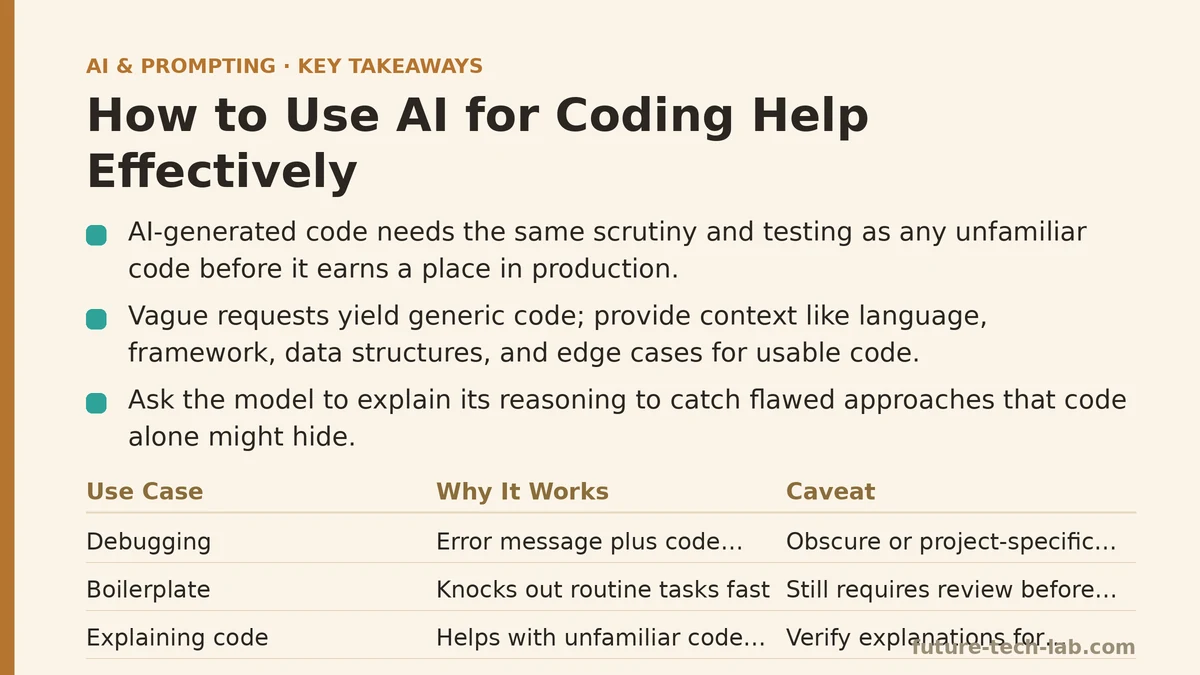
The risk isn’t that these tools underdeliver. It’s treating their output with the same blind trust you’d extend to a senior teammate’s code that’s already cleared review. AI-generated code needs the same scrutiny and testing as any other unfamiliar code before it earns a place in production.
Giving the Model Enough Context to Write Usable Code
A vague request like “write a function to process this data” gives the model almost nothing to work with, and what comes back tends to show it — generic code that won’t match your codebase’s conventions, your data structures, or the specific requirements your situation calls for.
Better context looks like this: name the programming language and framework or library, show the real data structure or format you’re working with (a concrete example goes a long way), mention any conventions already in use in your codebase, and spell out the edge cases or constraints that matter for your situation.
“Write a Python function using pandas that takes a dataframe with columns ‘date’, ‘amount’, and ‘category’, and returns a new dataframe summing ‘amount’ by month and category, handling the case where ‘amount’ might contain null values” produces far more usable code than the stripped-down version that leaves all of that out.
Ask for the Reasoning, Not Just the Code
Rather than taking generated code at face value, ask the model to walk through its approach alongside the code itself. That step lets you check whether the logic holds up for your specific case, instead of trusting something you don’t fully follow.
“Write this function and explain your approach, including why you chose this particular method over alternatives” gets you a response backed by visible reasoning — which makes it much easier to catch a flawed approach, or one that simply doesn’t fit your requirements, in ways the code on its own might hide.
Debugging Is Where AI Coding Help Shines
Pasting an error message along with the surrounding code and asking the model what’s likely causing it ranks among the most dependable uses for AI coding help. Error messages plus code context give the model something concrete to work from, rather than asking it to invent code from a vague description.
This approach holds up well for common, well-documented errors. Truly obscure or highly project-specific bugs can outrun what the model can diagnose from what it’s been handed — in those cases, treat its answer as a hypothesis worth checking, not a final verdict.
Test AI-Generated Code Before You Trust It
This is the lesson a production bug drove home for a junior developer I mentor. She pasted AI-generated code straight into a pull request without reading it closely first, and the bug it introduced took longer to track down than writing the function correctly from scratch would have. The output sounded so confident that careful review felt, in the moment, like an unnecessary step.
AI-generated code can hide subtle bugs, skip edge cases you never mentioned in your prompt, or mishandle your actual data — all while looking perfectly reasonable on the surface. Give it the same testing rigor you’d give code from any other source: run it against real test cases, check how it handles edge cases, read the logic line by line instead of skimming. That discipline matters no matter how polished the output looks, since confident phrasing tells you nothing reliable about correctness — for code any more than for AI-generated facts.
Let AI Explain Code You Didn’t Write
Beyond generating new code, asking an AI tool to explain something unfamiliar — legacy code, an unfamiliar library’s usage pattern, a colleague’s code you now need to modify — ranks among the strongest uses out there. Explaining and summarizing existing patterns plays to what these models do well, and tends to hold up better than generating brand-new code for complex, specific requirements.
“Explain what this function does, focusing specifically on the edge case handling in the conditional logic” gets you a sharper, more useful answer than a plain “what does this do,” which leaves the model guessing at what you want clarified.
Refine What You’ve Got Instead of Starting Over
The same principle applies here as with revising any piece of writing: if the generated code is close but not quite right, say exactly what needs to change within the same conversation — “this works but doesn’t handle the case where the list is empty, please add that” — rather than scrapping it and firing off a fresh request from zero. That targeted note gets you a better fix, faster.
A Quick Reference for Effective AI Coding Assistance
| Practice | Why It Matters |
|---|---|
| Provide specific context (language, data structure, conventions) | Produces code that fits your situation |
| Ask for explanation alongside code | Lets you verify the logic holds up |
| Use for debugging with real error messages | One of the most dependable use cases, with concrete context |
| Always test before trusting | Confident presentation says nothing about correctness |
| Use for explaining unfamiliar code | Plays to what the model does well: pattern explanation |
What I Told My Mentee After the Production Bug
I told her the problem was never using AI for coding help — that part speeds up routine work in ways that add up fast. The problem was skipping the review and testing that any code deserves before it goes somewhere being wrong actually has consequences.
She built a new habit from there: always run AI-generated code against real test cases before it goes in, and ask for the reasoning behind any non-trivial logic before trusting it. That cut down this kind of issue considerably, while she still gets the real time savings AI coding help provides for the routine work that fills most of her day.
Related guides: AI Prompt Security Best Practices for Enterprise Teams, AI Prompt Templates for Common Everyday Tasks, and AI Prompting Techniques for Sales Teams: Personalized Outreach and Deal Follow-Ups.
🔗 Recommended Reading
- How to Build a Semantic Search Engine with Embeddings: A Beginner's Step-by-Step Tutorial
- Building Your First RAG Chatbot: A Step-by-Step Tutorial for Beginners
- Function Calling for Beginners: A Step-by-Step Tutorial to Connecting LLMs to External APIs
- Vector Databases Explained: A Beginner's Guide to Storing and Querying Embeddings
- How to Evaluate LLM Outputs: A Beginner's Step-by-Step Tutorial to Testing and Scoring AI Responses