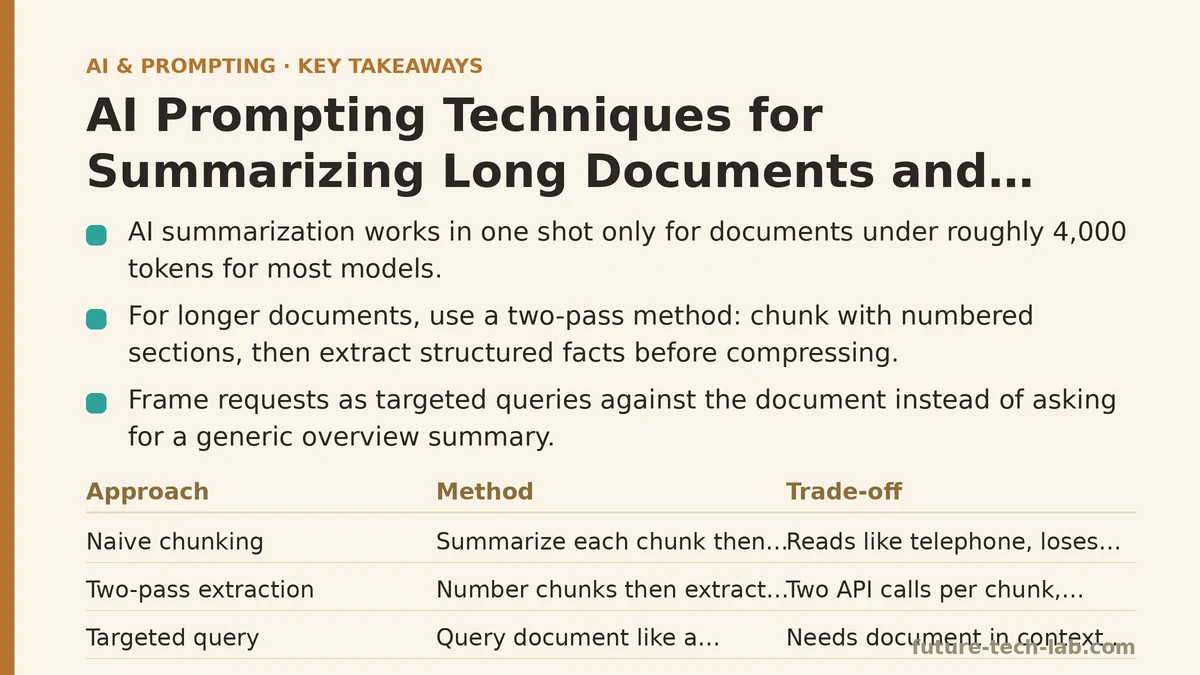
The common misconception is that summarizing a long document with an AI is a single action: paste the text, type “summarize this,” and collect a perfect digest. In practice, that works only for documents short enough to fit in the context window with room to spare — roughly under 4,000 tokens for most models. Everything longer requires a strategy, because a model that receives a truncated or chunked document without structure will produce a summary that is either incomplete, repetitive, or confidently wrong about what the document says.
This post answers the questions people ask most often when moving from manually skimming quarterly reports to building a repeatable AI summarization workflow. Each question addresses a specific failure point we hit, the technique that fixed it, and the trade-offs you accept when you adopt that technique.
Question 1: What is the fastest way to summarize a document that is longer than the model’s context window?
The naive approach — splitting the document into chunks and summarizing each chunk independently, then summarizing the summaries — produces a result that reads like a game of telephone. Each chunk-level summary loses detail, and the final pass has no access to the original text, so it cannot recover anything that was dropped. The result is a digest that is technically faithful but practically hollow: all the numbers are there, none of the nuance survives.
The better approach uses a two-pass method with explicit structural markers.
Pass one: chunk with numbered sections. Split the document at logical boundaries — headings, sections, or paragraphs — and prepend each chunk with a stable identifier. If your document has no headings, add them yourself: “SECTION 1: Introduction,” “SECTION 2: Methodology,” and so on. This gives the model anchors it can reference in later passes.
Pass two: extract, then compress. Instead of summarizing each chunk, extract structured facts from each chunk first: key claims, named entities, statistics, and conclusions. Store these in a table or a list. Only after extraction, compress the extracted facts into a narrative summary. Extraction preserves fidelity; compression provides readability.
Here is the chunking prompt I use with a Python script that splits a PDF into sections and feeds them sequentially:
import openai

def summarize_long_document(sections, model="gpt-4o-mini"):
    """
    Two-pass summarization: extract structured facts per section,
    then compress into a final narrative summary.
    """
    extracted_facts = []

    for idx, section in enumerate(sections):
        extraction_prompt = f"""
You are analyzing SECTION {idx} of a larger document.
Extract the following, verbatim where possible:
1. Main claim(s) of this section
2. All statistics, numbers, dates mentioned with their context
3. Named entities (people, companies, products, locations)
4. Any conclusion or recommendation stated
5. Any open questions or unresolved issues

Section text:
{section}
"""
        response = openai.chat.completions.create(
            model=model,
            messages=[{"role": "user", "content": extraction_prompt}]
        )
        extracted_facts.append(f"[SECTION {idx}]\n{response.choices[0].message.content}")

    # Compress pass
    compress_prompt = f"""
The following are structured facts extracted from a long document,
organized by section. Write a unified summary that:
- Combines related facts across sections
- Preserves all statistics and dates with their sections referenced
- Highlights conflicting claims if any exist
- Does NOT add information not present in the facts

Facts:
{chr(10).join(extracted_facts)}
"""
    final_response = openai.chat.completions.create(
        model=model,
        messages=[{"role": "user", "content": compress_prompt}]
    )
    return final_response.choices[0].message.content
The key difference from the naive approach: the extraction pass forces the model to record specific facts before compression happens, so nothing is lost to the summarizer’s tendency to smooth over details it deems unimportant. You trade a little latency (two API calls per chunk) for a measurable gain in factual recall.
Question 2: How do I get a summary that answers my specific question, not a generic overview?
A generic summary answers the question “what is this document about?” — which is rarely the question you have. You usually want to know “what does this say about the European market outlook?” or “what were the stated reasons for the budget variance?” The document is a means to an answer, not the subject of interest.
The technique is to frame your request as a targeted query against the document, not as a summary request. You turn the document into a database and your question into a query. The model’s job is to find and report the evidence relevant to that query, not to produce a balanced overview.
For a single long document, this works in one pass if the document fits in context. If not, you apply the extraction pass from Question 1, then query the extracted facts.
Here is the prompt pattern, tested with a 60-page due diligence report:
You are a research analyst. I will provide a document in sections.
Your task is to answer this specific question only:

"Based on the document, what are the key risks associated with the
proposed acquisition, and what evidence does the document provide
for each risk?"

Rules:
- Answer ONLY using information present in the document sections
- For each risk, cite the section number where it appears
- If the document does not address a risk you expected, say so explicitly
- Do not add industry knowledge or speculation
- Format your answer as a bulleted list, with each risk followed by:
  (a) the evidence from the document, (b) the section reference

Begin analysis now. Section 1 of the document follows:
The crucial addition is the explicit instruction to state what the document does not address. Without this, the model fills gaps with its own training knowledge, and you cannot distinguish between “the report says this” and “the model assumes this.” When you run this pattern, you get answers you can verify against the source — and you catch missing information that a generic summary would hide entirely.
Question 3: How can I trust a summary that came from a model that hallucinates?
You cannot trust any summary without verification. The realistic goal is not eliminating hallucination — it is making every claim in the summary traceable to a specific location in the source document. This is achievable with a simple convention: require the model to attach a citation to every claim that references a fact.
The citation does not need to be page numbers — those are unreliable when the model works from text chunks. It needs to be a section identifier or a quote. A summary that says “Revenue declined 12% year over year (Section 3: Financial Results, quote: ‘revenue for the fiscal year was $4.2M, down from $4.8M in the prior year’)” is verifiable. A summary that says “Revenue declined 12%” is not.
Here is the prompt addition that enforces this:
For every factual claim in your summary, append a citation in
parentheses using this exact format:
(Section: [section name], Quote: "[exact quoted text from the document]")

If you cannot find an exact quote to support a claim, do not make
the claim. Instead, say "Unsupported claim: [the statement you
considered making]". An unsupported claim is not penalized;
fabricating a citation is.

Example of an acceptable output line:
"Migration to the new CRM caused a 3-week delay in onboarding
(Section: Implementation Timeline, Quote: 'the migration overran
its planned duration by three weeks')."

Now produce your summary with citations.
In testing, this approach shifted the model’s behavior from confident generation to careful extraction. It also created a practical benefit: your team can spot-check any claim in the summary against the source in under a minute, which means the summary becomes a starting point for review rather than a black box you have to trust.
Question 4: What do I do when the document contains tables, charts, or data that cannot be represented as plain text?
PDF exports from business tools frequently contain tables that lose their structure when converted to plain text. When you paste a table as raw text, the model often misreads columns as rows or treats the header row as data. The result is a summary that reports the wrong numbers.
The fix is to normalize tables before they reach the model. Convert each table into a structured format the model can parse reliably — markdown tables work reasonably well, but JSON is safer because it preserves type information and key-value associations.
Here is the conversion step, which you run before the extraction pass:
import markdown
import json

def table_to_json(markdown_table: str) -> str:
    """
    Convert a markdown table to a JSON object with column names
    and typed values. Run this on each table in your document
    before passing text to the summarization model.
    """
    lines = markdown_table.strip().split("\n")
    if len(lines) < 2:
        return json.dumps({"error": "not a table"})

    headers = [cell.strip() for cell in lines[0].split("|")[1:-1]]
    rows = []
    for line in lines[2:]:  # skip separator line
        cells = [cell.strip() for cell in line.split("|")[1:-1]]
        if len(cells) != len(headers):
            continue
        row = {}
        for header, cell in zip(headers, cells):
            # Try numeric conversion
            try:
                row[header] = float(cell.replace(",", ""))
            except ValueError:
                row[header] = cell
        rows.append(row)
    return json.dumps(rows, indent=2)
Once tables are JSON, you can instruct the model to treat them as structured data: “For each numeric column, report the min, max, mean, and trend direction.” This is dramatically more reliable than asking the model to read a text-mangled table and “figure out what the numbers mean.”
A concrete failure we hit: a quarterly board deck contained a table with columns for revenue, margin, and headcount. Plain-text conversion produced a table where the header row was repeated every few lines. The model interpreted those repeated headers as data points and reported “revenue: header, header, header” as the revenue column. Converting to JSON eliminated the ambiguity because the model could see named keys with only numeric values.
Question 5: How do I summarize a document that is heavily opinionated or argumentative, without losing the author’s stance?
Many documents — policy memos, op-eds, competitive analyses, board proposals — are not neutral. The author has a position, and a summary that flattens the argument into “the author discusses X” fails to capture what matters: the author’s claim, their evidence, and their rhetorical strategy.
The technique is to instruct the model to preserve argumentative structure explicitly. Do not ask for a “summary” — ask for an “argument map.” An argument map identifies the thesis, the supporting premises, the counterarguments the author addresses (or ignores), and the conclusion.
The prompt pattern:
You will receive a document that argues a position.
Produce an argument map with these components:
1. THESIS: The author's central claim, stated in one sentence
2. SUPPORTING PREMISES: Each distinct reason the author gives
   for the thesis, numbered, with the evidence cited for each
3. ACKNOWLEDGED COUNTERARGUMENTS: Objections the author
   addresses, and how they respond to each
4. UNACKNOWLEDGED COUNTERARGUMENTS: Objections you can think
   of that the author does not address. Mark these clearly as
   YOUR analysis, not the document's content
5. CONCLUSION: The final position the author lands on

Do not editorialize in components 1-3. For component 4,
introduce each point with "[Analyst note:]" to distinguish
your contribution from the document's content.
This pattern serves a specific need: when you are preparing a decision brief for leadership and need to represent the strength of an argument fairly, not just its surface content. The “unacknowledged counterarguments” component is the most valuable part — it turns the summary from a passive transcript into an active analytical tool. You can flag weaknesses in an argument before your leadership gets blindsided by them in a meeting.
Question 6: How do I avoid losing critical information when summarizing in multiple passes?
Multi-pass summarization has an inherent information bottleneck: each pass compresses, and compression loses detail. The question is which details matter, and the answer varies by use case. There is no single technique that preserves everything — you must choose what to preserve and design your prompts around that choice.
For financial documents, preserve every number. For legal documents, preserve every defined term and every date. For technical documents, preserve every function name and its behavior. The extraction pass (Question 1) already helps, but you can amplify it by giving the model a specific preservation mandate before it compresses.
The mandate takes this form:
You are compressing a set of extracted facts. Before you compress,
review this preservation checklist. Every item in the checklist
must appear in your output, possibly in abbreviated form:

- All monetary amounts, with currencies and fiscal periods
- All dates, including deadlines and effective dates
- All proper nouns (names, organizations, product names)
- All percentages and ratios
- All references to legal or regulatory requirements
- All statements of uncertainty ("the company may", "further
  review is needed")
- All direct quotes that the original author marked as important

If any checklist item is missing from the source facts, write
"OMITTED FROM SOURCE" next to the nearest related content rather
than silently dropping it. Do not invent missing items.

Now compress the facts below.
The last instruction is the important one: “OMITTED FROM SOURCE” tells you what the document lacked, which is often as informative as what it contained. A summary that flags missing data is more useful than one that quietly skips it, because you can chase down the gap before you rely on the summary for a decision.
Question 7: When should I NOT use AI summarization at all?
This is the question nobody asks, and it is the most important one. AI summarization is the wrong tool when the document’s value lies precisely in its ambiguity, its tone, or its subtext. A legal contract is a good candidate for extraction (dates, parties, obligations) but a poor candidate for summarization (the meaning of a clause depends on every word). A diplomatic cable is a poor candidate because nuance lives in phrasing that a summary will inevitably flatten.
A useful rule of thumb: if the document is one where a single misinterpreted word changes the outcome, do not summarize. Read it in full. If the document is one where you need the gist and the key facts to make a go/no-go decision, summarize it with the techniques above — but always verify claims against the source before you act.
A second case where summarization fails: when the document has internal contradictions. A well-written summary will either hide the contradiction (if the model smoothes over it) or flag it (if you explicitly ask for conflicts). If you are summarizing a report that is internally inconsistent, the summary cannot tell you which version is correct — only a human reading the full text can do that.
A Quick Reference for Choosing Your Approach
| Your Situation | Recommended Technique | Key Trade-off |
|---|---|---|
| Document under 4,000 tokens | Single-pass summary with format constraints | Fastest, but no citation tracking unless requested |
| Document over 4,000 tokens, need overall picture | Two-pass extraction, then compression | Slower, but higher factual fidelity |
| Need answers to specific questions | Query-based extraction with explicit “what is missing” rule | Requires careful question phrasing |
| Need verifiable claims | Citation-enforced summary with exact quotes | More prompt engineering, but auditable output |
| Tables and data-heavy content | JSON conversion before summarization | Extra preprocessing step |
| Argumentative or persuasive document | Argument map instead of summary | Requires you to separate document claims from your analysis |
| Legal, diplomatic, or ambiguity-critical content | Read manually — do not summarize | No technique preserves the required precision |
The techniques above are not a substitute for reading, and they are not a substitute for judgment. They are a way to spend less time on the mechanical work of skimming and more time on the analytical work that only a human can do. When a summary saves you an hour of reading, invest ten minutes of that hour verifying the summary against the source. The time is not wasted — it is the difference between a summary you trust and a summary you hope is right.
Related guides: AI Prompting Techniques for Sales Teams: Personalized Outreach and Deal Follow-Ups, The React Prompting Framework: How Reasoning and Acting Work Together in LLMs, and Are AI Prompt Engineering Certifications Worth It? A 2025 Review.
🔗 Recommended Reading
- Function Calling for Beginners: A Step-by-Step Tutorial to Connecting LLMs to External APIs
- Vector Databases Explained: A Beginner's Guide to Storing and Querying Embeddings
- How to Evaluate LLM Outputs: A Beginner's Step-by-Step Tutorial to Testing and Scoring AI Responses
- LLM Guardrails for Beginners: A Step-by-Step Tutorial to Filtering Unsafe Outputs
- Building Your First AI Agent: A Beginner Tutorial with Python and the OpenAI API