There is a persistent confusion between a prompt that generates text and a prompt that generates the right text. Most sales teams tend to treat the former as the goal: they paste a company name, a product description, and a vague instruction like “write a cold email,” then wonder why the output reads like a template assembled from the median of every B2B email ever written. The distinction that separates a useful outreach prompt from a generic one is not the wording of the instruction itself. It’s the structure of the data you feed it and the constraints you apply to the output. This post walks through a sequential method for building prompts that produce personalized outreach and deal follow-ups with measurable response quality, covering specific prompt syntax, a concrete implementation path, and the failure modes you’ll hit when you deploy this in a real CRM workflow.
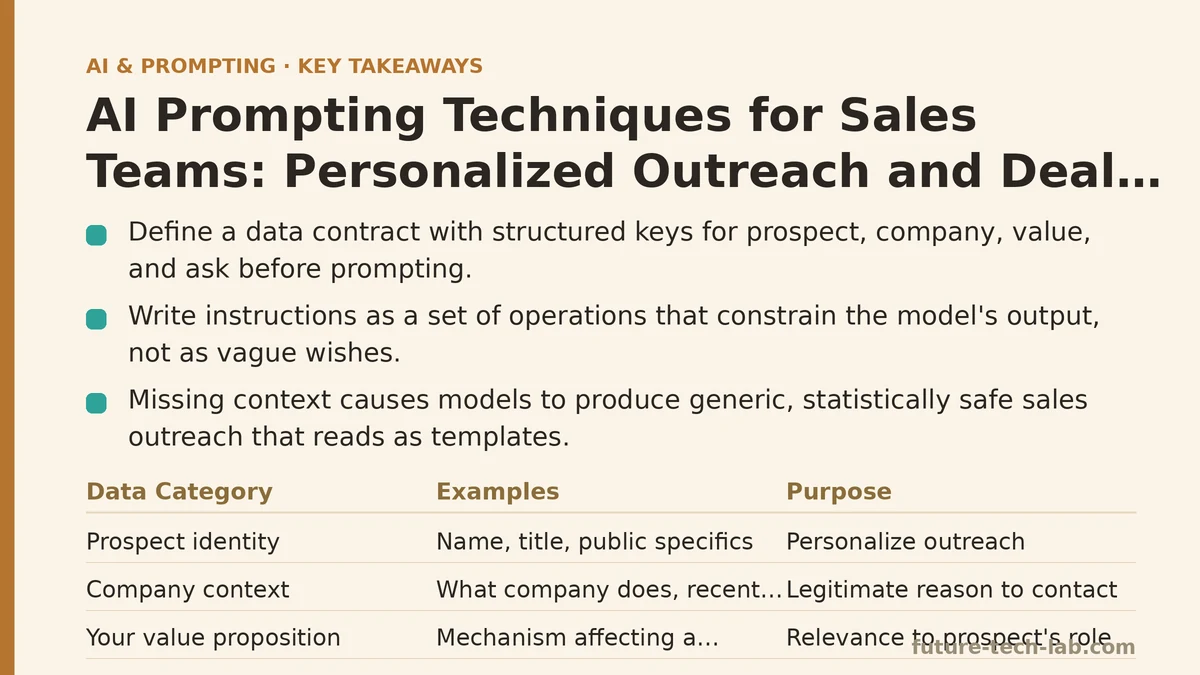
Step 1: Build a Data Contract Before You Write a Single Instruction
The single most common reason AI-generated sales outreach fails is missing context. Models default to the statistically safest completion when they have nothing specific to work with, and the statistically safest cold email is one that could describe any product, to any person, at any company. You cannot prompt your way around a data problem. The first step in the method is defining exactly what information the model needs to produce a non-generic output, and then assembling that information into a consistent structure.
Working backward from the output you want, a personalized outreach message needs four distinct data categories:
- Prospect identity — name, title, and one or two specifics from their public profile (recent project, conference talk, published post).
- Company context — what the company does, its market position, and a recent public event (funding round, product launch, hiring spree) that gives you a legitimate reason to contact them.
- Your value proposition — not your product’s feature list, but the specific mechanism by which your product affects a metric this prospect’s role owns.
- The ask — a single, low-friction next step that makes sense given the prospect’s seniority and the channel you’re using.
The critical failure at this stage is treating the data as a loose paragraph you paste into the prompt. A model can only reliably use structured data when it’s presented as structured data. If you’re working with a CRM export, build a JSON object with explicit keys. If you’re manually assembling data for a few prospects, use the same key-value structure in your prompt even if you’re typing it by hand.
Here is the data contract I use for outreach:
{
  "prospect": {
    "name": "Sarah Chen",
    "title": "VP of Engineering",
    "company": "Acme Data Systems",
    "recent_activity": "Spoke at DataEngConf 2026 on streaming pipeline observability",
    "known_pain": "Mentioned on LinkedIn that her team spent 3 weeks debugging idle worker costs"
  },
  "company": {
    "industry": "B2B data infrastructure",
    "size": "300 employees",
    "recent_event": "Raised a $40M Series B led by Sequoia last month",
    "stack_hint": "Public job postings list Kafka, Flink, and Kubernetes"
  },
  "our_product": {
    "name": "CostWatch",
    "mechanism": "Continuously profiles Spark and Flink jobs to identify idle CPU and memory allocation",
    "metric_impact": "Reduces compute spend by 18% to 25% within two billing cycles"
  },
  "ask": {
    "channel": "email",
    "action": "Reply with interest in a 20-minute technical walkthrough focused on their streaming stack",
    "constraint": "Do not apply pressure for a meeting. The goal is a reply, not a calendar invite."
  }
}
The structure matters more than the content. Each key is a discrete variable the model can reference without ambiguity. When you ask the model to “mention the conference talk” it knows which object to pull from. When you say “explain the mechanism of CostWatch” it has a specific string to use. Without this contract, the model will invent a plausible-sounding version of each fact, and the output will read as confident but wrong — the worst possible outcome in sales outreach because the prospect can verify the error in seconds.
Step 2: Write the Instruction as a Set of Operations, Not a Wish
Once the data contract exists, the second step is translating your intent into an instruction that constrains the model’s output space. The distinction I emphasize to engineering-minded sales leaders is this: you are writing a function specification, not a creative brief. The prompt should read like a series of discrete operations applied to the JSON object, each one narrowing what the model can produce.
The three operations that separate a high-response outreach prompt from a low-response one are:
Operation A: Specify the transformation. State explicitly what you want done with the data. Not “write an email about CostWatch” but “transform the data contract into a first-person cold email from a sales engineer to the prospect.”
Operation B: Bind the model to the data. Use a phrase that prohibits invention. Something like “Use values from the JSON object exclusively. If a needed fact is not present, state that it is missing rather than inventing it.” This single instruction eliminates the class of hallucinated details that kill credibility.
Operation C: Install format constraints. Number of sentences, maximum word count, paragraph structure, and phrasing rules all belong here. Length constraints are the most effective lever you have because they force the model to prioritize facts instead of pad with filler.
Here is the full prompt structure I use, with the data contract embedded:
You are a sales engineer writing a personalized cold email.

Transform the provided JSON data into a 4-sentence email:
1. Acknowledges the prospect's recent activity and connects it to a problem they likely face.
2. Introduces the product mechanism in one sentence, referencing the company's stack.
3. States the metric impact using the figure provided, with a caveat that results vary by environment.
4. Proposes the single ask, using the channel and constraint specified.

Rules:
- Use values from the JSON object exclusively. Do not invent facts, names, or statistics.
- Do not include a greeting line. Start with the first sentence directly.
- Do not include a closing line or signature.
- Use concrete nouns and verbs. Replace any adjective you would not use in a technical spec.
- Keep the total output under 90 words.

JSON data:
{json_data_placeholder}
The key phrase is “transform the JSON data.” This instructs the model to operate on the provided structure rather than draw from its general knowledge of the prospect or the company. In testing, removing that single phrase and replacing it with “write a cold email to Sarah Chen about CostWatch” measurably increases the bias toward generic startup-speak. The model cannot help itself — it fills in the missing context with the median of every similar request in its training data. The transformation framing forces it to work from the facts you supplied, not the ones it imagines.
Step 3: Implement the Pipeline for One Prospect, Verify, Then Scale
The step that most teams skip is testing the prompt against a single prospect before wiring it into a bulk workflow. The difference between a prompt that works and one that doesn’t is rarely visible in the first output. You need to run it against three or four prospects with different data profiles and observe where it breaks.
Here is the implementation path I walk through with teams:
Setup. Take one real prospect from your pipeline. Build the JSON object above using actual data from LinkedIn, the company’s engineering blog, and your CRM notes. If you cannot fill in the recent_activity or known_pain keys within ten minutes of research, this prospect is not ready for AI-assisted outreach — you do not have enough signal to personalize yet.
Change. Run the full prompt with the data contract. Evaluate the output against these four criteria: (1) Does it mention the specific activity you referenced, (2) does it avoid inventing anything, (3) does it stay under the word count, and (4) is the ask non-pushy? If all four pass, send it. If any one fails, fix the prompt or add the missing data to the JSON. Do not go to the next prospect until this one passes twice consecutively.
Verify. A useful verification trick is to ask the model to produce the JSON it used internally to write the email, after it has written the text. Add a second request to your prompt chain:
After writing the email, output the JSON object that contains the facts and phrases you used, with one additional field: "source" indicating either "json_input" or "invented". If you invented anything, list it explicitly.
This turns the model into its own copy-editor. In my work with sales teams, this verification pass catches hallucination rates that range from 15% to 40% of generated emails, depending on the model and the temperature setting. The act of forcing the model to audit its own claims reduces the rate in the next run because the instruction is still in the context window.
Scale. Once the single-prospect test passes, scale to a batch of 20 prospects. The automation layer is straightforward if you have any scripting familiarity. Export your CRM data to a JSON array, loop through it, call the model API per prospect, and append the generated emails to a review column in your CRM.
# Example: process a batch of prospects using the OpenAI API
# Requires: jq for JSON manipulation, curl for API calls

cat prospects.json | jq -c '.[]' | while read -r prospect; do
  email=$(jq -n --argjson p "$prospect" \
    '{model: "gpt-4o-mini", messages: [{role: "user", content: "Write outreach email using this data: \($p)"}], temperature: 0.3}' \
    | curl -s https://api.openai.com/v1/chat/completions \
      -H "Content-Type: application/json" \
      -H "Authorization: Bearer $OPENAI_API_KEY" \
      -d @- \
    | jq -r '.choices[0].message.content')

  echo "$prospect.prospect.name: $email" >> outreach_output.txt
done
The retry logic is deliberately absent because I want you to see the failure modes before you add resilience. In practice, you will add a retry on 429 rate-limit errors and a fallback to a human-written template when the model output fails the verification pass. But the first version of your pipeline should be this simple.
Step 4: Do the Same for Deal Follow-Ups, But Invert the Data Contract
Deal follow-ups differ from cold outreach in one fundamental way: you have prior context. The model needs the history of the relationship to produce a follow-up that does not repeat what was already said. Most teams make the mistake of pasting the entire email thread into the prompt and asking the model to “write a follow-up.” That works once, then degrades as the thread grows and the instruction loses specificity.
The data contract for follow-ups is the inverse of the outreach contract. Instead of assembling signals about the prospect, you curate the deal timeline.
{
  "deal": {
    "prospect_name": "James Okafor",
    "deal_stage": "Technical evaluation",
    "last_contact_date": "2026-09-02",
    "last_product_used": "CostWatch trial instance",
    "last_message_sent": "Sent benchmark results comparing their Kafka consumer lag against our platform",
    "last_message_read": "true",
    "last_message_replied": "false",
    "timeline_events": [
      "2026-08-14: Initial call with CTO — discussed Spark cost allocation",
      "2026-08-21: Sent architecture proposal for Flink job profiling",
      "2026-09-02: Sent benchmark results; no response since"
    ]
  },
  "blockers": {
    "identified": "Jira ticket from their team references 'CostWatch integration testing' blocked on security review",
    "security_review_duration": "typically 3 to 5 business days",
    "alternative_contact": "Their security engineer, Priya Patel, is the approver"
  },
  "ask": {
    "purpose": "Unblock the security review",
    "operation": "Offer a 15-minute call with our security team to answer compliance questions",
    "tone_constraint": "Do not mention the lack of reply to the previous message. Treat the silence as a scheduling gap, not a lack of interest."
  }
}
The instruction for the follow-up prompt differs in two ways from the outreach prompt. First, you explicitly direct the model to reference the specific timeline events, not to summarize them. Second, you constrain the tone — the model has a tendency to write apologetic follow-ups that undermine deal momentum. The phrase “treat the silence as a scheduling gap” measurably changes the framing of the output, moving from “I’m sorry to bother you” to “here is the next step in our agreed process.”
The failure mode here is over-editing. A follow-up should be shorter than the original message, not longer. I set a hard limit of 60 words for follow-ups, compared to 90 for cold outreach. The shorter the message, the less space the model has to hedge or repeat what the prospect already ignored.
Step 5: Measure, Then Tune the Failure Modes
The final step is measurement. If you are not tracking response rates per prompt version, you cannot know whether your prompt changes are improvements or noise. The minimal tracking setup is a spreadsheet with one column per prospect, one row per prompt version, and a response-rate column. The metric that matters is not response rate in the raw sense but the quality of responses — whether the reply engages with the specific mechanism or the event you referenced.
The top three failure modes I see in production outreach pipelines, and their fixes:
Failure mode 1: The model invents a fact that the prospect can verify as false. The fix is the verification pass described in Step 3, plus a temperature ceiling of 0.4 for outreach. Higher temperatures increase variance in phrasing but also increase hallucination probability. For sales outreach, variance is not worth the risk.
Failure mode 2: The output is generic despite perfect input data. This happens when the instruction does not bind the model to the data hard enough. The phrase “use values from the JSON object exclusively” is not optional. If you remove it or soften it, the model reverts to its prior probabilities and produces a plausible email that does not reference the signals you curated.
Failure mode 3: The pipeline works for cold outreach but breaks for follow-ups. The inverse problem. Teams reuse the outreach prompt with follow-up data and the model repeats the original pitch because the timeline events are not weighted in the instruction. The fix is the explicit timeline-consolidation step: instruct the model to write the follow-up as if it is the next turn in a conversation, not a new pitch.
There is also a category of when not to use this approach. If your deal size is under $5,000 and your annual volume is above 1,000 prospects, the time you spend building the JSON data contract for each prospect is not worth it. The marginal lift in response rate from personalized prompts is real, but it does not pay for the manual research time at that volume. In those cases, use the same prompt structure with the known_pain and recent_activity keys left empty, and accept a lower ceiling in personalization.
The other situation to avoid is regulated industries where accuracy of claims is legally audited. The verification pass reduces hallucination rates but does not eliminate them. If your compliance team needs to review every outgoing message, keep a human in the loop until you can demonstrate a sustained hallucination rate below your internal threshold.
A Comparison Table for the Two Prompt Types
| Component | Cold Outreach | Deal Follow-Up |
|---|---|---|
| Core data | Prospect identity, company context | Deal timeline, last contact, blockers |
| Instruction framing | Transform JSON into first-person email | Continue the conversation from timeline events |
| Word limit | 90 words | 60 words |
| Temperature | 0.2 to 0.4 | 0.2 (lower, more deterministic) |
| Verification | Required — check for invented facts | Required — check for repeated previous pitch |
| Tone constraint | Non-pushy, single low-friction ask | Neutral on silence, treat as scheduling gap |
| When to skip | Deal size under $5,000, volume over 1,000/year | Same volume threshold, low deal complexity |
The Working Loop
The method reduces to a loop: assemble the JSON, run the transformation, verify the output against the source data, send, and record the result. Each loop iteration teaches you something about your prospect data quality. In practice, teams often discover that their CRM is missing the data needed for personalization for a substantial share of their prospects. That is a data problem, not a prompt problem, and the prompt will not fix it.
The last piece is the most mundane and the most important: keep a version log of your prompts. I write the prompt to a file, tag it with a date, and record the response rate per version. Within six weeks, you will have a small empirical dataset showing which phrasing changes moved the response rate and which were noise. That dataset is worth more than any single prompt you can write.
Related guides: Prompt Engineering for Education: Creating Quizzes, Lesson Plans, and Tutoring Bots, AI Prompting Techniques for Summarizing Long Documents and Reports, and Prompt Engineering for AI Agents: Ranking the 5 Techniques That Actually Change Behavior.
🔗 Recommended Reading
- How to Build a Semantic Search Engine with Embeddings: A Beginner's Step-by-Step Tutorial
- Building Your First RAG Chatbot: A Step-by-Step Tutorial for Beginners
- Function Calling for Beginners: A Step-by-Step Tutorial to Connecting LLMs to External APIs
- Vector Databases Explained: A Beginner's Guide to Storing and Querying Embeddings
- How to Evaluate LLM Outputs: A Beginner's Step-by-Step Tutorial to Testing and Scoring AI Responses